1. Home
  2. >Field Service Management Software
  3. >Work Order Management

Field Service Work Order Management

Every Job Tracked. Every Dollar Billed. From Creation to Close.

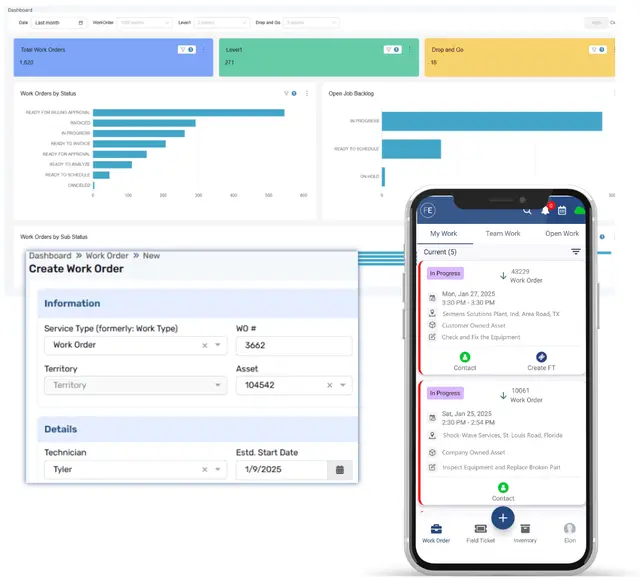
FieldEquip’s field service work order management software handles the full lifecycle of every job—from creation and dispatch to field execution, approval, and invoice—on a single platform. Pre-filled templates, configurable workflows, and direct ERP integration eliminate the manual re-entry and disconnected spreadsheets that slow your billing cycle and cost you revenue.

See It in ActionEstimate Your ROI in 2 Minutes
Field Service Work Order Management
Skip to main content
FieldEquip
  • FieldEquip

    Products

    Explore all of our products that can help your growth

    • Field Service Management
      • Work Order Management
      • Dispatching & Scheduling
      • Digital Field Ticketing
      • Time Management
      Explore More Features
    • Equipment Rental
      • Rental Management
      • Inventory Management
      • Equipment Location Tracking
      • Invoicing & Billing
      Explore More Features
    • Oilfield Logistics
      • Dispatch & Load Management
      • Field Ticketing
      • Invoicing & Billing
      • Compliance & Inspections
      Explore More Features
  • FieldEquip

    Industries

    Explore all of our industries that can leverage our product

    • Industrial Services

      Industrial Services

      Field and in-shop service for rotating equipment, compressors, turbines, and railcar etc.

    • Oil & Gas

      Oil & Gas

      Purpose-built for oilfield services like drilling, well completion, water transfer, downhole tools, and pipeline.

    • Equipment Rental

      Equipment Rental

      Service & rental management for industrial equipment, generators, machinery etc. in one platform.

    • Railcar Repair & Service

      Railcar Repair & Service

      Railcar repair management software streamlines maintenance operations with AAR standard billing

    • Utility & Energy Services

      Utility & Energy Services

      Purpose-built for power T&D, solar, wind, EV charging, water systems, and carbon capture.

  • FieldEquip

    Company

    Get to know more about our company & what we stand for

    • Why FieldEquip

      One Platform. One Team. Full Accountability.

    • Trust & Security

      Security and Reliability Built Into the Platform

    • About

      Built from Field Experience. Delivered as a Modern Platform.

    • Integrations

      Direct Integration with Your Core Systems

  • FieldEquip

    Resources

    Get the Insights, tools, and learning materials

    • Case Studies

      How teams improve operations and scale

    • White Paper & Guides

      Frameworks for modern field service systems

    • Videos & Testimonials

      How teams use FieldEquip in practice

    • Blogs / Field Notes

      Insights on field service and operation

Schedule a Demo
FieldEquip
Schedule a Demo

Work orders that live in spreadsheets, email threads, and disconnected systems don’t just create inefficiency. They leak revenue.

  • Finance workflow icon

    The job was completed. The work order was never closed.

    When work orders live in disconnected systems, jobs fall through the gap between completion and close-out. The result: unbilled labor, missing material charges, and invoices that ship weeks late.

  • Field operations management icon

    Three systems. Three versions of the same job. None of them match.

    Dispatch, field, and finance each re-enter the same job data into different systems. By the time the invoice ships, hours and parts don’t match. The dispute cycle begins.

  • IT system integration icon

    You can’t staff what you can’t see.

    Without a centralized view of open and upcoming work orders, staffing decisions rely on guesswork. Technicians sit idle in one region while another is overloaded. Deferred maintenance becomes an emergency repair.

FieldEquip is built to close these gaps. Here’s how.

Template-Driven Work Order Creation

Create Once. Execute Everywhere. Invoice Without Re-Entry.

  • Create work orders in a single click using pre-built templates with tasks, checklists, parts, services, and pricing already attached. Templates enforce consistency across offices and divisions. No critical steps are skipped. No pricing guesswork in the field.

  • FieldEquip configures distinct workflows per work type—controlling which fields display, which are mandatory, what notifications trigger, and who approves. Preventive maintenance follows a different path than emergency repair, but all live in the same system with unified reporting.

  • Approved quotes convert into work orders instantly—with pricing, scope, and terms locked in. No re-entry between sales and operations. The job starts with the same numbers the customer signed off on, eliminating pricing discrepancies that create billing disputes.

  • When a technician closes a work order against a warranted asset, the warranty terms are already visible — coverage percentages, exclusions, and remaining duration. If the work qualifies, the claim files against that same work order and moves into assessment instead of straight to invoice, so nothing gets billed to a customer before someone decides whether it’s covered.

Mobile Work Order Management Software

Execute in the Field. Capture Every Detail. Stay Connected to the Office.

  • Field technicians access work order details, service history, and checklists on any mobile device—online or offline. FieldEquip’s mobile work order management software captures labor hours, materials, photos, and customer signatures. Everything syncs when connectivity returns.

  • The back office sees which work orders are open, in progress, completed, or awaiting approval—updated the moment field status changes. No end-of-day phone calls. Replace fragmented oversight with a unified operational dashboard. The best work order management software for field service helps supervisors monitor workloads and optimize field operations from one centralized view.

  • FieldEquip AI generates accurate, professional job notes instantly from field data—replacing manual typing at the job site. Complete work order documentation captured in seconds, not minutes. Every record is audit-ready and feeds directly into approval and billing.

  • Attach mandatory or optional checklists to any work order template—JSA forms, safety inspections, maintenance procedures, compliance documentation. Technicians complete them in the mobile app with digital signatures. Field work order automation ensures completed forms stay attached to the work order for audit purposes.

Ready to see field service work order software in your environment?

Get a Demo
 Invoice Integration

Close the Loop. From Completion to Invoice, Nothing Gets Lost.

  • Completed and approved work orders flow directly into billing with labor, materials, equipment charges, and customer-specific pricing already validated. No re-keying between the field and finance. The time between job close-out and invoice generation compresses from weeks to the same billing cycle.

  • Every approved work order closes in your ERP the same day — no batch export, no manual push, no reconciliation step between field close and financial close. FieldEquip's pre-built connectors to Infor SyteLine, KPA, Microsoft Dynamics, and Vista / Spectrum by Viewpoint are built and maintained by the same team that built the platform.

  • Work orders roll up across divisions, offices, and business units with role-based access controls. Finance sees consolidated billing. Operations sees workload distribution. Granular billing flags handle jurisdiction-level tax and cost code allocations without manual intervention.

  • When unused materials come back from the job site, the return corrects the estimated material cost on the work order automatically — no manual adjustment, no reconciliation step before invoicing. Warehouse stock updates the moment the item is physically received, so nothing goes missing without a trace.

Up to 15%

Reduction in order-to-cash cycle time

60–80%

Less manual data re-entry between field and finance

*Based on FieldEquip customer data

2–3x

Faster ticket-to-invoice cycle

8 weeks

Average enterprise go-live

Frequently Asked Question

How does FieldEquip's purchase order workflow connect to inventory management?

Purchase orders are created directly from threshold-based reorder triggers set in FieldEquip's inventory management module. When stock at a warehouse or job site drops below a defined level, a purchase order enters the fulfillment workflow without a separate manual purchasing step.

What is purchase request software and how does FieldEquip handle it?

Purchase request software lets a technician, dispatcher, or office staff flag a parts need the moment it comes up, instead of a phone call or email chain. In FieldEquip, that purchase request converts directly into a purchase order, checked against available stock and routed for approval, without re-keying the same information twice.

Does FieldEquip include purchase order approval software?

Yes. Every purchase order routes to an approver from a controlled group of users with PO approval permissions before it can reach a vendor. Approval routing can be configured by purchase order value, vendor, or department, and every decision — approved or rejected — is logged with a timestamp.

Can technicians pick up parts directly using a Will-Call purchase order?

Yes. A Will-Call purchase order lets a technician present a valid PO number directly at the vendor counter and get the part on the spot, without waiting for a scheduled delivery.

Does FieldEquip's procurement software integrate with our ERP system?

Yes. FieldEquip integrates directly with SAP, Infor SyteLine, KPA, Microsoft Dynamics, Vista/Spectrum by Viewpoint, and Intuit QuickBooks — no middleware and no third-party connectors. Purchase orders, receiving records, and material returns sync with your financial system.

What's the best solution for order and invoice management in procurement software for field service?

FieldEquip connects the purchase order side of procurement — creation, approval, vendor submission, and receiving — directly to job costing and customer invoicing, so material costs captured on a purchase order flow straight into the invoice for that job, without manual re-entry between purchasing and billing.

Can FieldEquip aggregate demand across multiple jobs into one purchase order?

Yes. When multiple jobs need the same part, FieldEquip aggregates that demand into a single purchase order instead of generating duplicate requests from separate crews.

How does FieldEquip handle unused material returned from a job?

When a job closes with leftover materials, FieldEquip routes the return back to the warehouse against the original work order. This immediately corrects the estimated material cost and updates stock once the item is physically received — closing the loop between what was issued, what was used, and what came back, with no material lost to trucks or write-offs.

Does FieldEquip flag warranty coverage before a job is billed?

Yes. Work orders against a warranted asset surface the active warranty terms automatically. If a claim is filed, it stays linked to that work order through assessment — pending, pre-approved, approved, or rejected — and only an approved claim reduces what the customer is billed.

Every Unclosed Work Order Is Revenue You’ve Already Earned but Haven’t Billed.

FieldEquip’s field work order management software closes the gap between the work your team completes and the revenue your business collects. One platform. No handoffs. Go-lives measured in weeks, not quarters.

Schedule a Demo
FieldEquip Logo

Connected field service built for industrial enterprises, field ticketing, and asset management on a single proprietary system.

1011 S. Hwy. 6, Suite 117,
Houston, Texas 77077, USA

+1 281-815-4314

Products

  • Field Service Management
  • Equipment Rental
  • Oilfield Logistics

Industries

  • Oil & Gas
  • Industrial Services
  • Equipment Rental
  • Railcar Repair & Service
  • Utility & Energy Services

Company

  • Why FieldEquip
  • About
  • Trust & Security
  • Integrations
  • Contact Us

Resources

  • Case studies
  • Whitepapers & Guides
  • Videos & Testimonials
  • Blog & Field Notes

© 2026 FieldEquip. All rights reserved.

Privacy PolicyCookie PolicyTerms of Use